







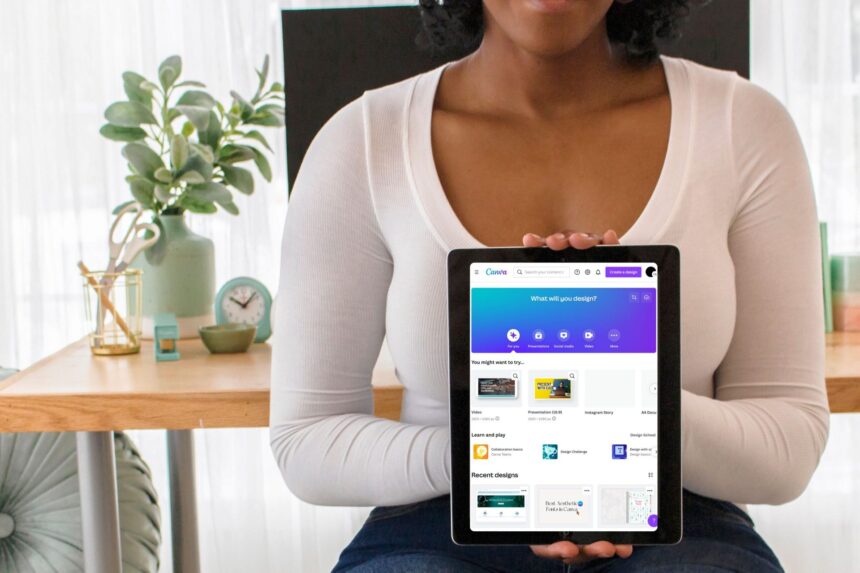
If you want to earn money online but don’t have any design or technical skills, Canva is one of the best tools to start with. Canva is simple, free to use, and packed with templates that anyone can customize. In 2025, millions of beginners are using Canva to start small businesses, build side-income streams, and even create full-time careers—without needing any special training.
- Why Canva is the Best Tool to Make Money Online in 2025
- Earn Money with Canva by Selling Digital Products
- Sell Canva Templates for Small Businesses
- Earn Money as a Canva Social Media Manager
- Create and Sell YouTube Thumbnails
- Offer Resume and Cover Letter Designing Services
- Create Valuable Digital Planners and Sell Them Online
- Sell Canva Designs as Print-on-Demand Products
- Start a Canva-Based Freelancing Business
- How Much Money Can You Earn with Canva?
- Tips to Succeed with Canva in 2025
- Start Your Canva Income Journey Today
- FAQs
This detailed guide will show you how to earn money with Canva using easy, beginner-friendly business ideas. Each method is 100% legit, safe, and allowed under Google AdSense policies. If you want to grow your online income the right way, this article can help you get started today.
For more ethical online earning guides, you can also check out the tutorials on whitehatfinance.com, where we share only trusted and white-hat methods to make money online.
Let’s begin.
Why Canva is the Best Tool to Make Money Online in 2025
Canva makes earning online simple because you do not need advanced design skills. It works with drag-and-drop tools, ready-made templates, and easy download options.
People love Canva because:
It works on mobile and laptop
It has thousands of free templates
Anyone can create professional designs
You can download designs instantly
You can sell your designs on many platforms
You can offer services even if you are a beginner
Because of this, Canva has become a favourite tool for freelancers, students, stay-at-home parents, and people who want to start a side hustle.
Earn Money with Canva by Selling Digital Products
Selling digital products is one of the most profitable ways to earn money with Canva. You create a design once and sell it again and again without any extra work. This creates passive income.
Here are some popular Canva digital products that people buy every day:
Printable wall art
Business card templates
Instagram templates
Ebook covers
Study planners
Resume templates
Wedding invitations
Calendars
Logo templates
Many of these products sell for $3 to $20 on platforms like Etsy, Gumroad, and Creative Market. Even a small shop with 20 to 30 templates can start earning consistently.
How to Start Selling Digital Products
Create a free Canva account
Choose a niche (business templates, planners, social media designs, etc.)
Create 10–20 templates to start with
Export your designs as high-quality PDF or PNG
Upload them to Etsy or Gumroad
Add a good title, description, and keywords
Promote your shop on Pinterest or Instagram
This method needs some effort in the beginning, but once your products are listed, they can earn money even while you sleep.
Sell Canva Templates for Small Businesses
Small businesses need designs every day—menus, flyers, posters, brochures, and social media posts. You can create these templates on Canva and sell them as pre-made bundles.
Some high-demand templates include:
Restaurant menu templates
Real estate listing templates
Fitness trainer templates
Salon and spa templates
Travel agency templates
Cafe social media posts
You can sell these bundles for $10–$50 depending on how many designs you include.
This is a great low-competition business idea because small businesses always need fresh designs and are happy to pay for ready-made templates.
Earn Money as a Canva Social Media Manager
Many businesses want someone to create their social media posts. Canva makes this very easy. You can offer social media design services even if you are a beginner.
What you can create:
Instagram posts
Reels covers
Facebook posts
YouTube thumbnails
Pinterest pins
Branding kits
You can charge clients monthly for content packages, such as:
10 posts per month
20 posts per month
30 posts per month
Social media managers charge anywhere from ₹5,000 to ₹30,000 per client depending on their experience and quality of work.
This is one of the easiest long-term income options you can start today.
Create and Sell YouTube Thumbnails
YouTube creators need eye-catching thumbnails. Good thumbnails can increase views, so creators are always ready to pay for them.
You can make thumbnails quickly using Canva’s pre-made YouTube templates. You can offer:
Under 1-minute delivery
Multiple variations
Bulk thumbnail packages
Platforms like Fiverr, Upwork, and Facebook groups are great places to find clients.
A simple thumbnail can earn you ₹200 to ₹1000, and if you work with 5 to 10 YouTubers regularly, you can earn a stable monthly income.
Offer Resume and Cover Letter Designing Services
Resume design is one of the most stable and in-demand services. Students and job seekers always need professional resumes. Canva has hundreds of ready-made resume templates, which makes the process simple and fast.
You can offer:
Resume design
Cover letter design
LinkedIn banner design
Resume editing
You can charge ₹500 to ₹2000 per project depending on how detailed the resume is.
This is easy work that anyone can start without experience.
Create Valuable Digital Planners and Sell Them Online
Digital planners are extremely popular on Etsy and other marketplaces. Canva helps you create:
Daily planners
Budget planners
Study planners
Meal planners
Workout planners
Business planners
Many creators earn ₹20,000 to ₹1,00,000 per month selling digital planners alone.
If you want long-term passive income, this is one of the best Canva business ideas.
Sell Canva Designs as Print-on-Demand Products
Print-on-demand (POD) is a business where you design artwork and upload it to platforms like Redbubble or Teespring. When someone orders the product, the company prints and ships it. You get paid a commission.
Canva allows you to create designs for:
T-shirts
Mugs
Stickers
Posters
Phone cases
Hoodies
This method requires no investment, no stock, and no shipping management. It’s a great beginner-friendly online business.
Start a Canva-Based Freelancing Business
With Canva, you can become a freelancer in many different categories:
Poster designer
Logo designer
Brand identity designer
Business card designer
Ebook designer
Presentation designer
Platforms to start freelancing:
Fiverr
Upwork
Freelancer
LinkedIn
Internshala
Freelancing is a flexible way to earn money because you can choose your own clients, rates, and projects.
How Much Money Can You Earn with Canva?
Your earnings depend on your effort and type of business. Here is an estimated idea:
Selling digital products: $50 to $500 per month
Freelancing: ₹10,000 to ₹50,000 per month
Social media management: ₹20,000 to ₹1,00,000 per month
YouTube thumbnails: ₹5,000 to ₹30,000 per month
Print-on-demand: $20 to $200 per month
Resume services: ₹5,000 to ₹25,000 per month
If you stay consistent, your income will grow every month.
Tips to Succeed with Canva in 2025
Be consistent
Choose a niche
Use high-quality templates
Study what designs are trending
Keep your designs simple and clean
Learn basic color combinations
Promote your work on social media
Canva success depends mostly on practice and creativity. You don’t need to be a professional designer. You just need to create designs that people find useful.
Start Your Canva Income Journey Today
Canva allows anyone—student, homemaker, beginner, or freelancer—to build a real online income with zero investment. If you want to learn more ethical and safe online money-making ideas, make sure to explore the guides available on whitehatfinance.com.
Start small, keep learning, and be consistent. The more designs you create, the more money you can earn.
FAQs
Can I use the free version of Canva to make money?
Yes. Canva Free is enough for beginners. You can upgrade to Canva Pro later if needed.
Is it legal to sell Canva designs?
Yes, as long as you follow Canva’s Content License and do not resell templates without changes.
How much can a beginner earn with Canva?
Beginners usually earn ₹5,000 to ₹20,000 per month. With experience, this can grow much higher.
Do I need to show my face or voice?
No. Canva work is fully behind the scenes.
What is the easiest Canva business for beginners?
Selling digital products and YouTube thumbnails are the simplest beginner options.